
Table of Contents
What Is a Cyber Attack?
Cyber-attack means gaining unauthorized access to computers and networks with the intention of stealing data and causing damage. Cyber-attacks can occur anywhere and at any time.
People who perform cyber-attacks are known as cybercriminals, black hat hackers, malicious hackers, or hackers. Generally, cybercriminals or black hat hackers operate individually or within self-created organized criminal groups.
Cybercriminals use a variety of techniques to perform cyber-attacks. Their job is to find vulnerabilities in the system and exploit them to achieve their goals.
Cybercriminals have different ways of working and their motives. For example:
- Some cybercriminals launch cyber-attacks for personal or financial gain.
- Some hackers or attackers work for terrorist groups.
- Some carry out cyber-attacks simply for entertainment or personal satisfaction.
- Some hackers perform hacking exclusively on social media.
Cyber Attack Statistics
What are the costs and impacts of cyber-attacks on businesses?
- 60% of small businesses or companies close within a few months due to cyberattacks.
- On a daily basis, there are over 2100 cyber-attacks worldwide.
- According to an IMF report, the world could lose up to $23 trillion due to cybercrime and cyberattacks by 2027, which would be 175% more than in 2022.
- According to a survey, US businesses lose $20 billion every year.
- Cyber insurance has increased by 28% due to cyber-attacks.
- Data breaches cost the US an average of $9.44 million.
How prepared are businesses and organizations to protect against cyberattacks?
- 30% of companies and businesses do not have a sufficient budget for cybersecurity.
- Only 50% of businesses in the U.S. have cybersecurity services.
- More than 40% of businesses do not have cybersecurity services available.
- 23% of companies provide cyber awareness training to their employees.
- 700,000 cybersecurity jobs have been opened in the U.S.
Top 14 most Common Types of Cyberattacks in Cyber Security
1. DoS/DDos Attack
What it is:
The main purpose of Denial-of-Service (DoS) and Distributed Denial-of-Service is to overload the system by sending requests to the attacker’s system, so that they cannot provide service to the genuine users.
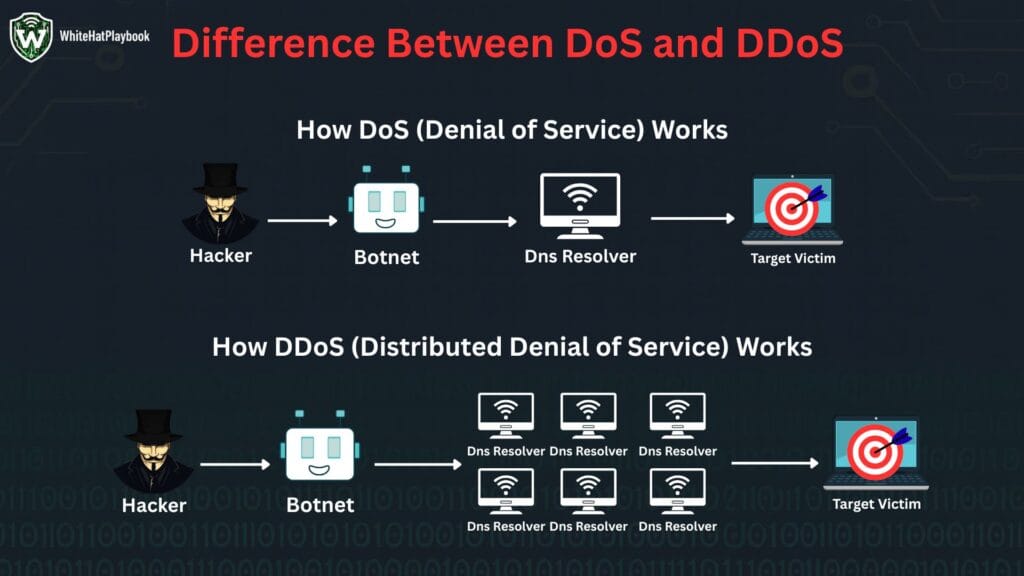
The difference between Denial-of-Service (DoS) and Distributed Denial-of-Service (DDoS) is only in the name but both follow the same logic. Denial-of-Service (DoS) overloads the system by sending requests to it and in Distributed Denial-of-Service (DDoS) a specific target system is attacked using botnet. That is why it is called Distributed.
How it works:
DoS/DDoS attack sends fake requests to the sites of the target system and overloads them. The server tries to process those requests. As a result, the site either becomes very slow for genuine users or shuts down completely.
In February 2020, Amazon Web Services (AWS) was hit by the largest DDoS attack in internet history.
2. Man-in-the-middle (MITM) Attack
What it is:
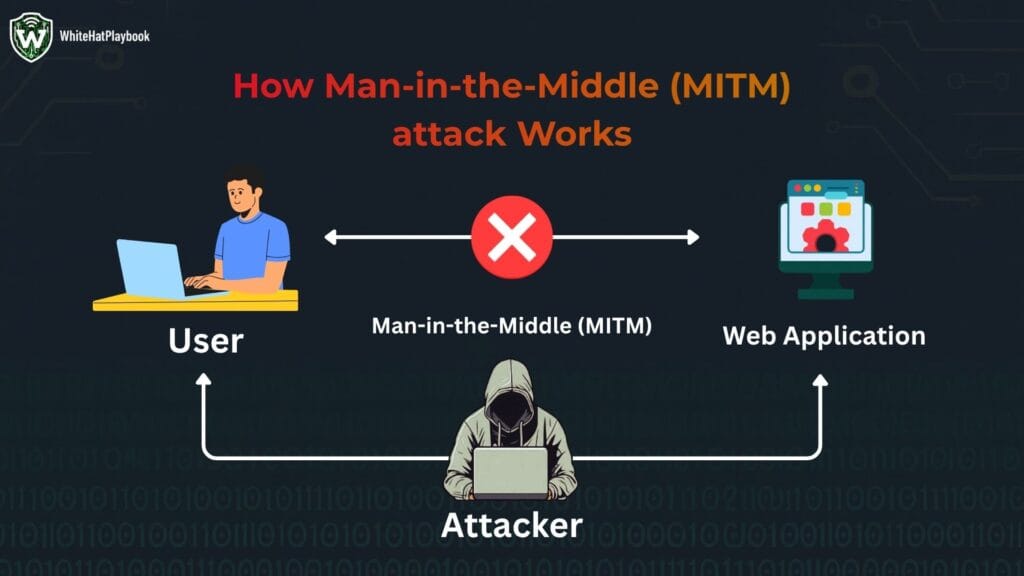
A “Man in the Middle (MITM) attack” is an attack in which the attacker sits between two computers and networks and monitors the data being transmitted between them. The attacker sits between two parties and monitors their communication. The attacker can also modify and listen to the messages being transmitted in the communication.
How It Works:
3. Phishing Attack
what it is:
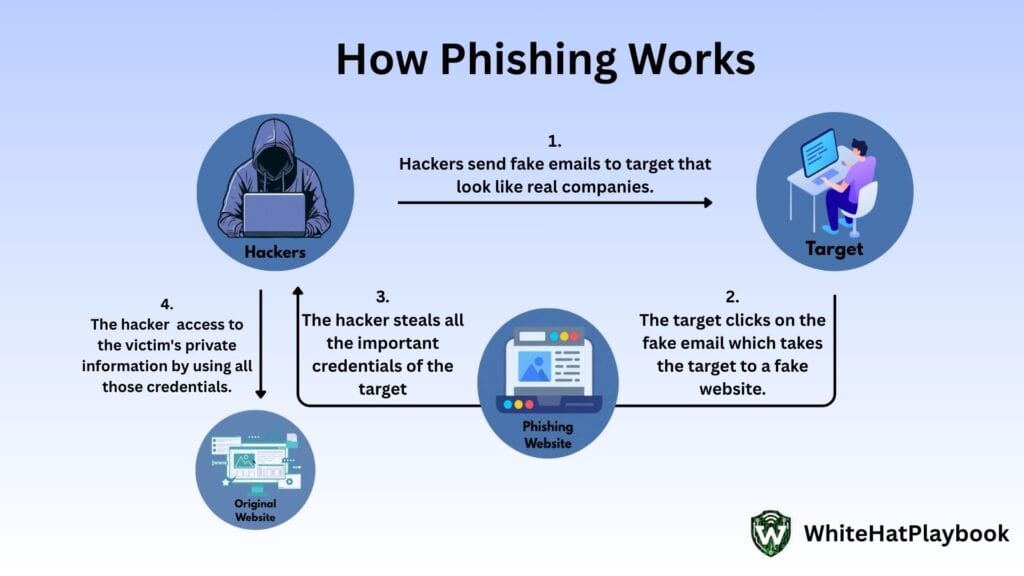
Phishing is a form of social engineering attack. In this attacker sends you messages (like calls, emails and SMS) that appear to come from a trusted source (like banks, companies) to steal your sensitive information (like bank details, OTPs, passwords).
How it works:
4. Malware Attack
what it is:
Malware means malicious software designed to hack or harm a device (such as a computer, laptop, phone, etc.). Malware can come from any entry point: through phishing emails and messages, through a link, through an unsafe website or download, or even through a USB pen drive.
If malware gets installed on a device, it can harm the device in a variety of ways. Like:
- Can steal personal data, passwords, bank details from your device.
- Can crash your device.
- Can keep an eye on you through malicious software, such as your live location, your call details, etc.
5. Ransomware
what it is:
Ransomware is a cyber-attack that installs malicious software on your system or device, locking all your files and data, or even locking your device itself, preventing you from accessing anything. The hacker or attacker then demands a ransom to decrypt the files or unlock the device.
how it works:
- First, malware enters your device through malicious software.
- Once the malicious software is installed in the system, it starts running in the background.
- After running, the malware encrypts all the files and data of the device or the entire device, so that the user or the victim cannot access them.
- When the files or the device is encrypted, the attacker demands ransom or money from the victim to decrypt them.
- Even after making the payment, there is a risk whether the attacker will give the decryption or not, and if he is giving the decryption key, then whether it is the correct key or not.
6. password attacks
what it is:
Password attacks are a common cyberattack. The attacker attempts to crack a password using various methods. Sometimes, the attacker can guess the password themselves or pay an insider to obtain it.
7 Types of Password Attacks:
- Brute Force Attack: Brute force attacks are the most common method of password attack. In this attacker tries every possible combination until they find the correct password.
- How it Works: Passwords are generated using automated tools using basic user information (like name, birthday, anniversary or any personal detail) and the password is tested.
- Dictionary Attack: In this method, the attacker uses a wordlist, which is a predefined list of similar possible passwords, to crack the password. This is a smarter version of a brute force attack. It can also contain common words, phrases, or data breach passwords. Automated tools (like John the Ripper, Hydra, Hash cat) are used to generate wordlists.
- Hybrid Attack: A hybrid attack is a combination of both brute force and dictionary attacks. This means that the attacker first generates a wordlist and then modifies it in a brute-force style.
- Rainbow Table Attack: In this technique, the attacker creates a precomputed table using plaintext passwords and their hashed values. If the hacker gets hold of the user’s hashed password, they match it with the precomputed table to derive the correct password.
- Keylogger Attack: With the help of a keylogger, an attacker can record every key pressed on the keyboard, without the user even knowing. Using this technique, an attacker steals all the user’s sensitive information, including personal data, credit card details, bank details, and private emails and messages.
- Pass-the-Hash Attack: In this technique, the attacker steals the user’s password hashes and uses them to log into the system. The specialty of this attack is that the attacker can log into the system without hacking the original password, simply by using the hash.
- Reverse Brute Force Attack: In a reverse brute force attack, a hacker takes a common password (e.g., 123456, password1234) and tries to match it with multiple usernames. If the attacker has the data-breach password, they can use it to gain access to multiple user accounts.
7. SQL injection attacks
what it is:
SQL is the language used in databases. The attacker inserts their malicious code into the input field of the web application, which becomes part of the SQL query and the attacker executes it on the database.
8. DNS spoofing
what it is:
Using DNS spoofing, the attacker adds fake records to the DNS server, which redirects the user to a fake website. When the user enters his sensitive and personal details on that fake website, the attacker either sells those details or misuses them.
Sometimes, using DNS spoofing, the attacker also creates a duplicate website of a company with offensive content to tarnish the image of the company. The user thinks that this is the original website.
9. Social Engineering
what it is:
Social Engineering is a technique in which, instead of hacking the system, the attacker manipulates the victims and extracts their sensitive information. Using this information, the attacker makes them do wrong things. They force them to take wrong actions for their own benefit.
Social engineering can also be called “human hacking” because it targets human emotions (such as fear, curiosity, urgency). This allows the attacker to create an environment that forces the victim to break normal security rules.
10. Session Hijacking
what it is:
In session hijacking, a hacker hijacks a user’s session or steals their session ID and joins the session without a username or password. After logging in to a website, the server provides the user with a session ID, which indicates that the login user is authenticated. If an attacker steals this session ID, they can access all the rights and benefits of the session.
Session hijacking can be done in many ways, such as:
- Packet Sniffing: In which a hacker can capture packets passing between servers using a tool like Wireshark.
- Cross-Site Scripting (XSS): In which a hacker finds an XSS vulnerability in a website, injects malicious code into it, and then runs that script to steal the session cookie.
- Man-in-the-Middle (MITM): In which a hacker can see, hear, and manipulate everything happening between servers.
- Session Fixation: In which the attacker tricks the victim into logging in with a fixed session ID. The attacker then uses the same ID to log in to the session.
- Malware: The hacker installs malware on the device, which finds the session tokens and sends them to the hacker.
11. Trojan Viruses
what it is:
Trojan virus attack is a malicious software which disguises itself as a legitimate software. In this software, the attacker creates such a program that the software appears safe to the user. But the attacker has inserted malicious code inside it. If this malicious software is present in our system, then the attacker can install malware in our device or system and can also control our system.
The name Trojan Horse is taken from a Greek story. As the Greek soldiers were silenced in the Horse of the Woods and were lost in the city. People gave him a gift and let him go to the city, after entering the village, the solider came out and attacked.
12. Web Attacks
what it is:
In web attacks, attackers target websites or web applications, find vulnerabilities, and exploit them. They then gain unauthorized access, steal personal data, or crash the website itself.
13. XSS Attacks
what it is:
In XSS or cross-site scripting, the hacker injects malicious JavaScript code into a specific website. When the user opens the browser of this website, the code gets executed and all the login credentials of the user go to the attacker. The attacker then uses those credentials to log in to the original website and uses the rights and benefits of that website like a genuine user.
14. Eavesdropping Attacks
what it is:
In eavesdropping attacks, the attacker silently listens to, captures and observes the traffic going through the network. Due to which eavesdropping attacks are also called digital espionage.
In Active Eavesdropping, the hacker can listen to the network traffic and interfere with it by staying in it. In this way, the hacker can also modify the packets and forward them.
In Passive eavesdropping, the hacker can only listen to the network traffic silently without the user knowing.
How to protect yourself and others from cyber-attacks?
- Make sure the password is secure.
- Don’t use the same password for all your accounts; use different passwords for each account.
- Create a password that combines capital and lowercase letters, numbers, and symbols to make it strong.
- Make sure your password is at least 12 characters long.
- Set up 2FA and Multi-Factor Authentication (MFA).
- Never depend just on passwords; always use additional verification codes like 2FA.
- Google Authenticator and other 2FA apps protect you as well.
- Maintain software and device updates
- Keep your mobile, iOS, laptop, and browser updated regularly. Any vulnerabilities in your system are fixed after updating them.
- Make sure your system’s automatic update feature is always enabled.
- Make use of malware and antivirus software
- Keep antivirus installed in your laptop or computer, because if there is any software in your system which contains malware or virus, then using antivirus detects it.
- Scan your device regularly using an antivirus.
- Use caution when using public Wi-Fi.
- Do not use public Wi-Fi (like airports, cafes, Wi-Fi towers) for your personal work (like bank logins, shopping).
- If it’s really important, use a VPN (Virtual Private Network). This encrypts your data.
- Change your router’s default password to a strong password.
- Defend yourself against phishing scams
- Do not click on any suspicious link received in the message.
- If any urgent message appears to be from a bank, first verify the real source of the sender.
- Do not click on any unknown link.
- Make regular backups of your files.
- Always keep a backup of all your important files, data and documents.
- The best option for taking backup is cloud or external hard drive.
- Verify the privacy settings and social media accounts.
- Keep your phone number and personal details private. Don’t share your social media login passwords with anyone.
- Try to keep your social media account private.
- Visit websites that use only HTTPS
- If you are doing any work online, always check and ensure that the URL of the website starts with ‘https://’.
- Your private information could be compromised if a website does not use https.
- Continue spreading awareness
- Read the guidelines of CERT-In (Computer Emergency Response Team).
- Follow cyber security news.
- Alert your family and friends to avoid cyber security attacks.